What is my elevation? Check your altitude above sea level
Device altitude updates in realtime as you move.
🔒 Your GPS data is processed on your device. Only if you use "Lookup on web" or place search, coordinates or the place name are sent to the Open-Meteo elevation service — nothing is ever stored.
What Is My Elevation? — Altitude Above Sea Level
Find your current elevation instantly with GPS — shown in meters and feet. Free, works on any phone, no app needed.
How to check your elevation
- Tap Find My Elevation and allow location access.
- Stand outdoors or near a window for the best GPS fix — altitude needs a stronger signal than position.
- Your height above sea level appears in meters and feet, along with your coordinates and accuracy.
What is elevation?
Elevation (or altitude) is your height measured from mean sea level (MSL). Coastal cities sit near 0 m, plateaus and hill stations sit hundreds or thousands of meters up, and the air gets noticeably thinner above ~2,500 m. Knowing your elevation is useful for trekking, cycling climbs, weather understanding, fitness (training at altitude), and simple curiosity when travelling through ghats and mountains.
Familiar elevations for comparison
| Place | Elevation |
|---|---|
| Mumbai (coastal) | ~14 m / 46 ft |
| Pune | ~560 m / 1,840 ft |
| Bengaluru | ~920 m / 3,020 ft |
| Ooty / Shimla (hill stations) | ~2,200 m / 7,200 ft |
| Leh, Ladakh | ~3,500 m / 11,500 ft |
| Mount Everest summit | 8,849 m / 29,032 ft |
How accurate is GPS altitude?
Vertical GPS accuracy is usually ±5–20 m under open sky — less precise than horizontal position, because satellite geometry favors horizontal measurement. Phones with a barometric sensor can do better. The Altitude Accuracy tile shows your current margin; smaller is better. Readings indoors or in dense city streets can be off, so treat them as a guide.
How to enable website location on your phone?
First, go to your device settings and turn on Location, then follow these steps:
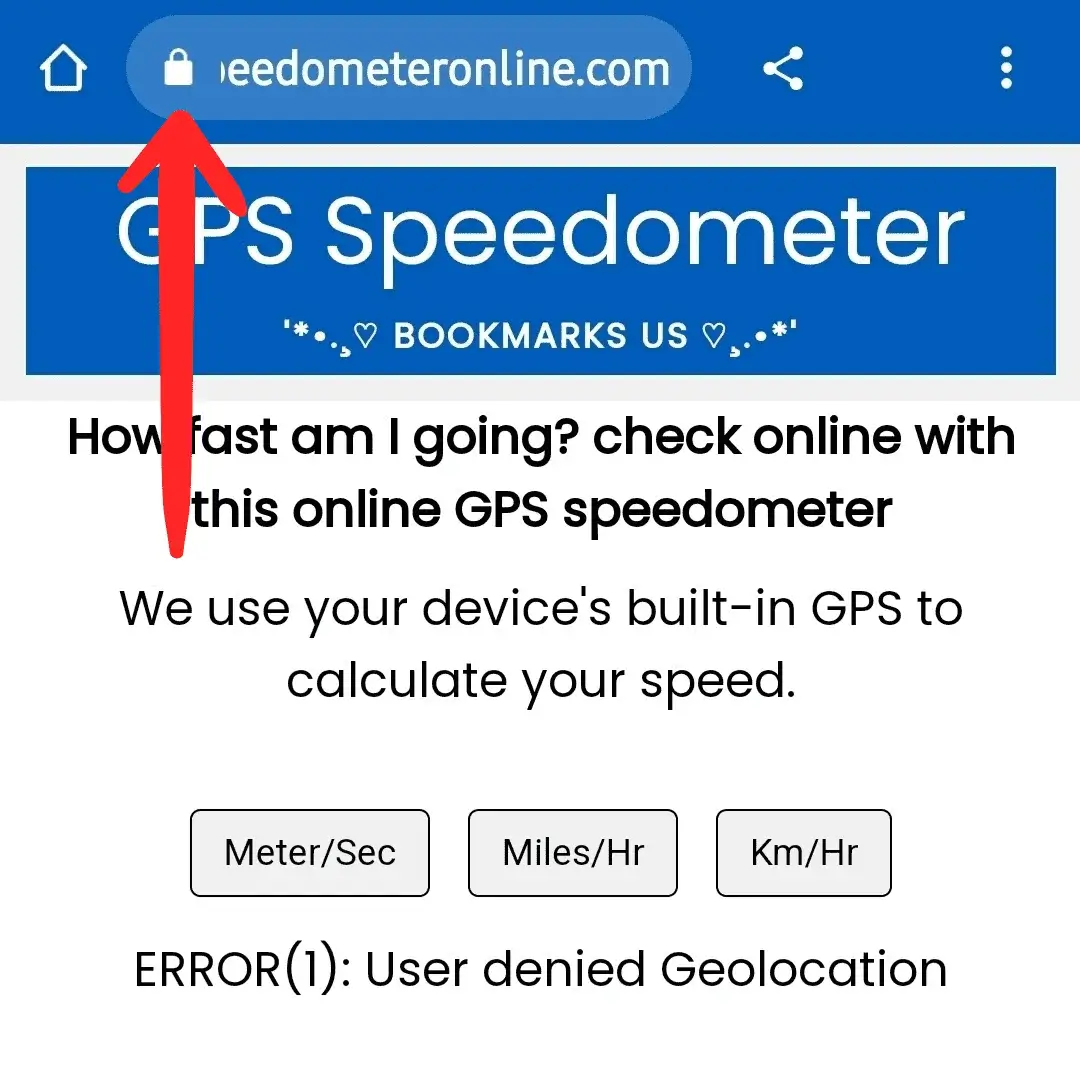
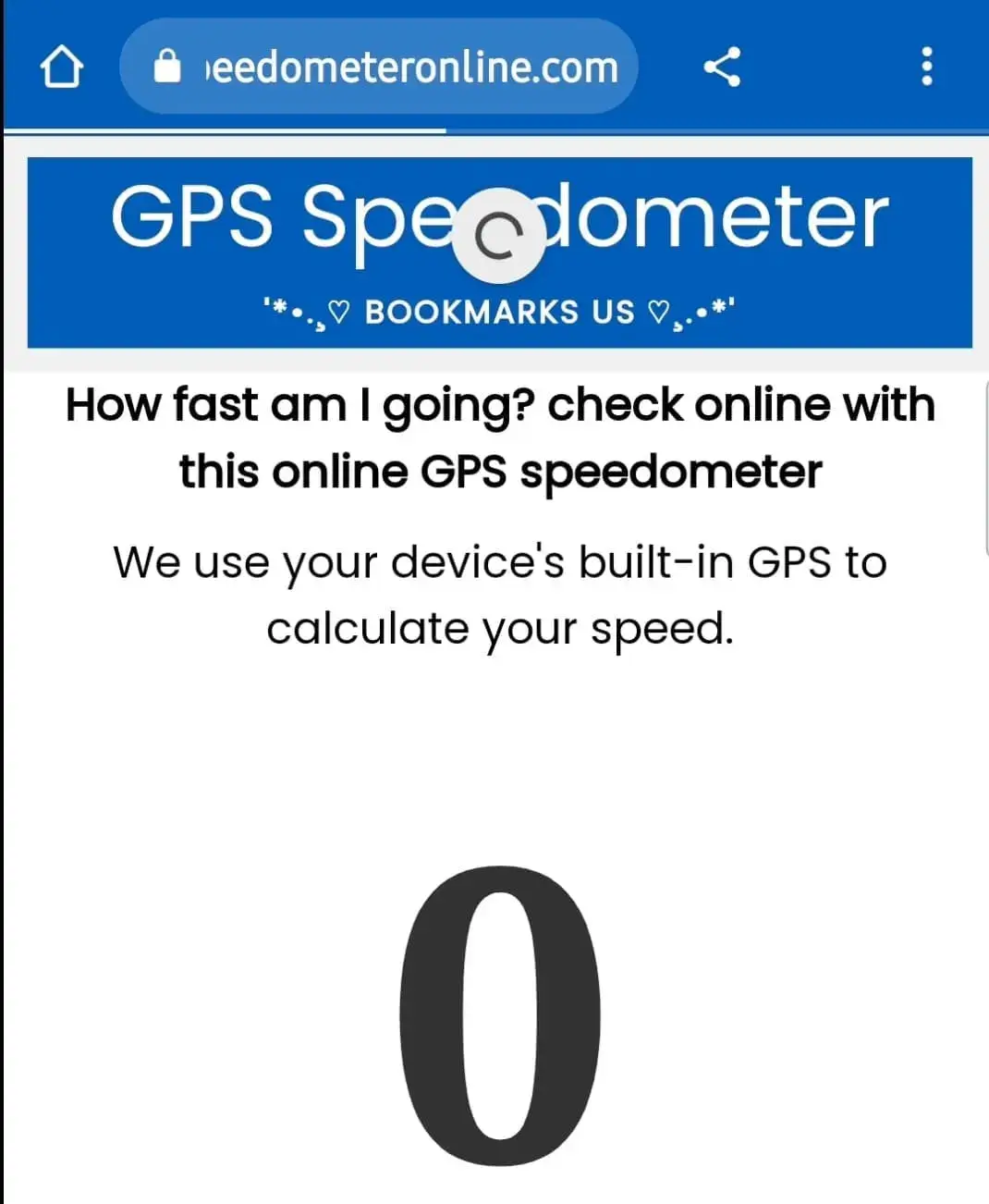
Step 1: Open SpeedometerOnline.com and tap the Lock icon at the top of your browser.
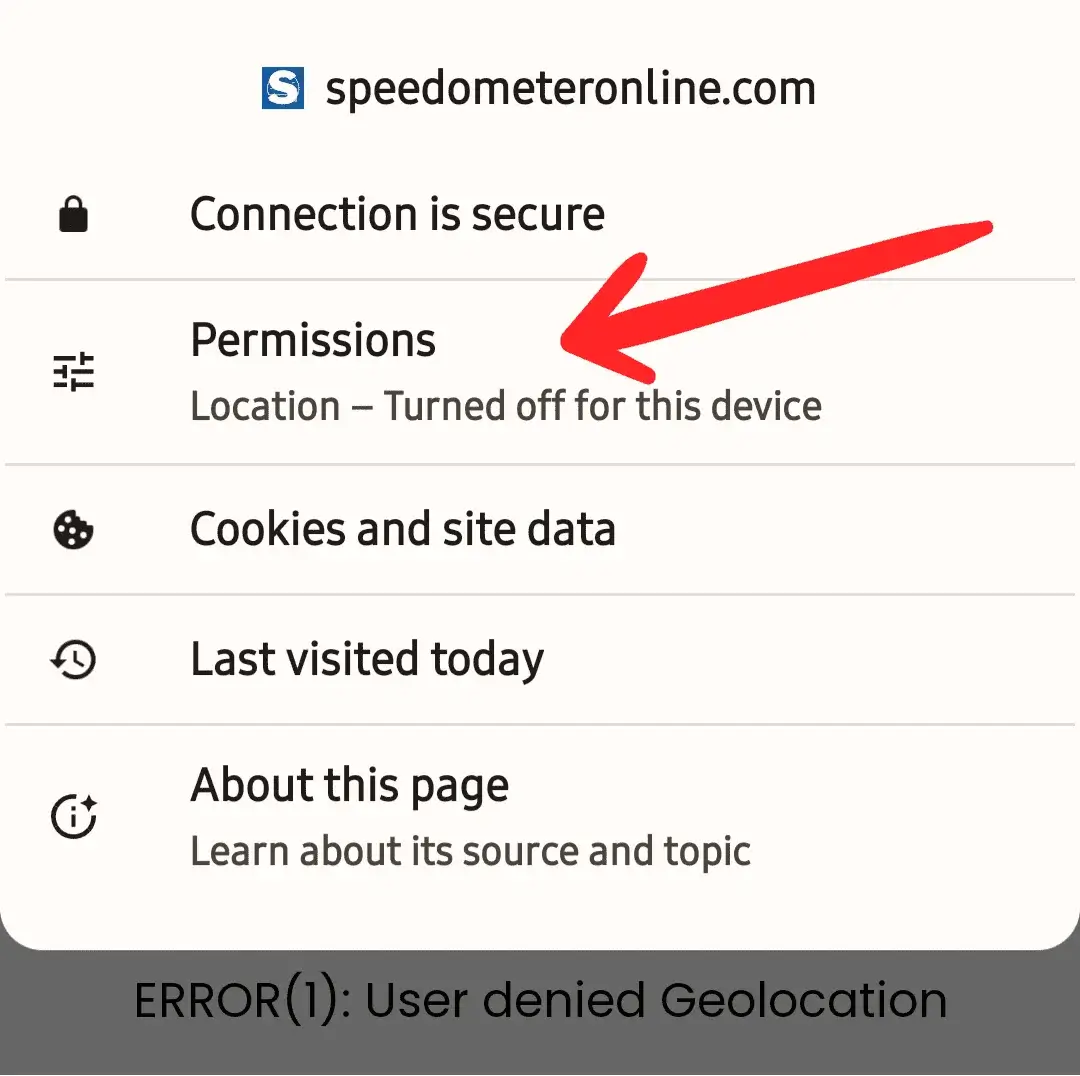
Step 2: Tap the Permissions option.
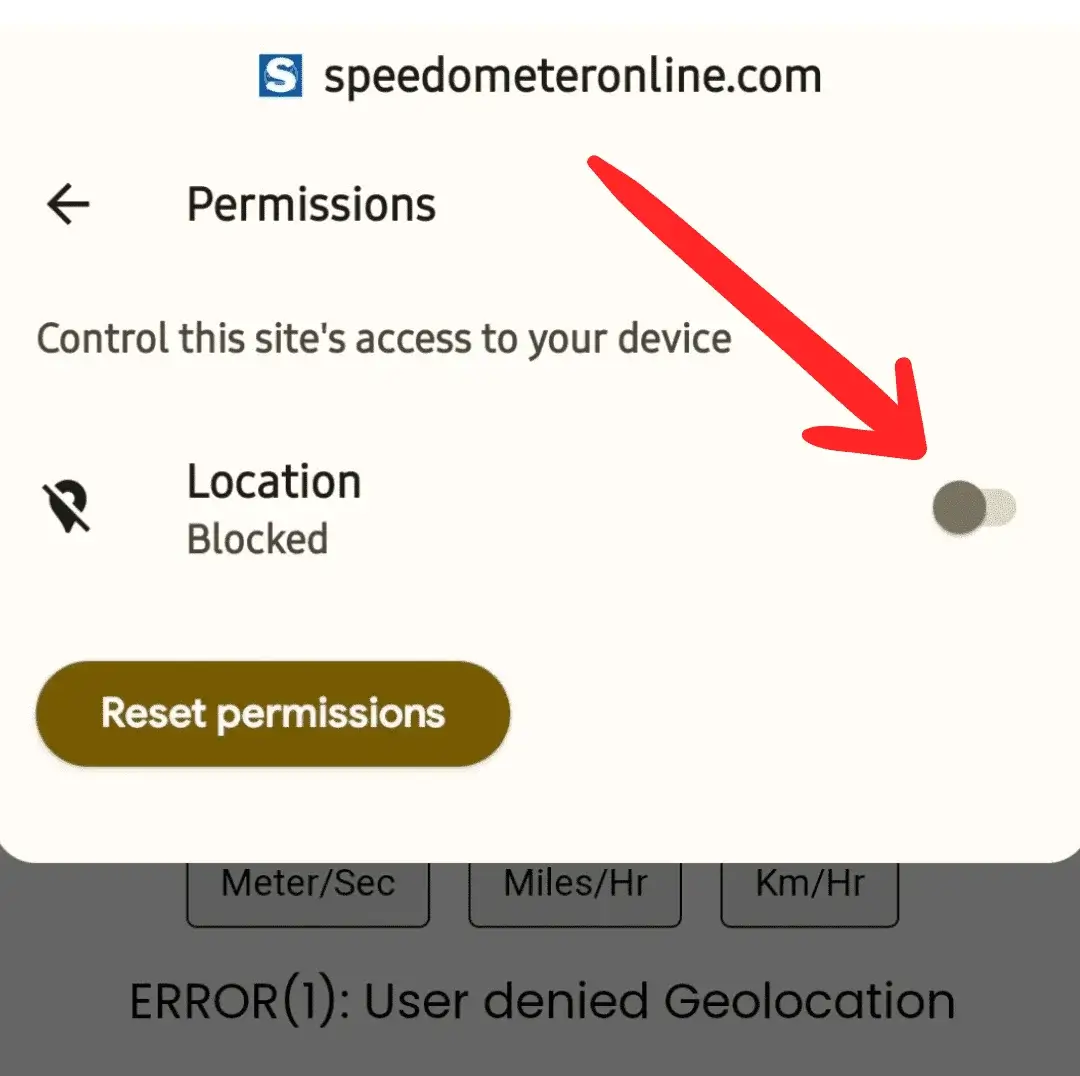
Step 3: Tap the switch to enable Location access.
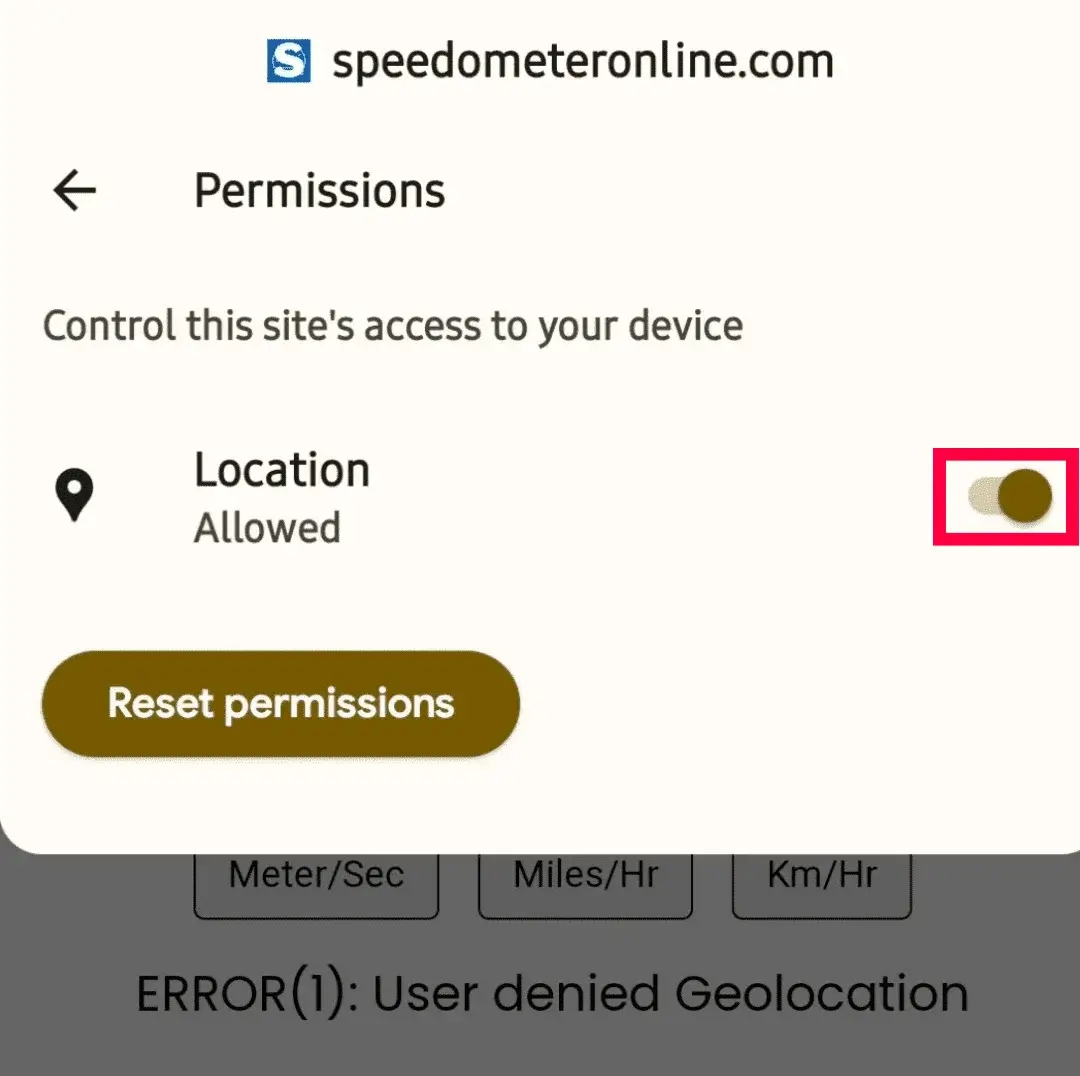
Step 4: The switch should now look like this — turned on.
Step 5: Refresh the page — it will start showing your travelling speed.
More free tools on this site
🧪 Speedometer Test
Test your dashboard speedometer accuracy vs GPS.
🏠 GPS Speedometer
Live speed in km/h, mph, m/s & knots with trip stats.
⚡ How Fast Am I Going?
One-tap answer to your current speed.
🚆 Train Speed Checker
Measure your train’s speed from your seat.
🚌 Bus Speed Checker
Check bus speed and estimate arrival time.
🚗 Car Speedometer
Verify your dashboard’s true speed via GPS.
⛶ Full Screen Speedometer
Giant digits for dashboards & bike mounts.
🧭 Online Compass
Find your direction in degrees instantly.
Check the elevation of any place in the world
Not just your own position — tap Change on the location bar and search any city, hill station, or landmark to see its elevation above sea level in meters and feet. Try "Leh", "Ooty", "Denver" or "Paris". This uses precise terrain elevation data from the web, so it works even for places you've never visited.
Device GPS vs web lookup — which is more accurate?
Use device reads your phone's GPS altitude and updates in realtime as you move — typical accuracy ±5–20 m. Lookup on web checks your coordinates against a surveyed terrain elevation database — usually accurate within 1–2 m, but it's a snapshot that doesn't update as you move. For trekking use device mode; for "what's the exact elevation here" use web lookup.
Why we show the boiling point of water
Air pressure drops as you climb, so water boils below 100 °C at altitude — roughly 1 °C lower for every 294 m of elevation. In Leh (~3,500 m) water boils at about 88 °C, which is why cooking takes longer in the mountains. The Boiling Point tile calculates this live from your current altitude.
Frequently Asked Questions
How do I find my elevation above sea level?
Tap Find My Elevation, allow location access, and your altitude appears in meters and feet within a few seconds.
How accurate is the reading?
Typically ±5–20 m outdoors with clear sky. Check the Altitude Accuracy tile for your live margin.
Why does it say altitude unavailable?
Some devices/browsers don't report altitude, or the GPS fix is weak. Move outdoors and try again after a few seconds.
Is my location stored anywhere?
No — everything is processed on your device. We never receive or store your position.
Can I check elevation while trekking without internet?
Yes, once this page is open — GPS altitude comes from satellites, not the internet.
Can I check the elevation of another city without going there?
Yes — tap Change on the location bar and type any place name. You'll get its elevation above sea level in meters and feet from precise web terrain data.
Why does water boil at a lower temperature at high altitude?
Atmospheric pressure decreases with height, so water needs less heat energy to boil — about 1 °C lower per 294 m of elevation. Our Boiling Point tile shows the value for your current altitude.